Feed

26 posts

Post

Completely Impractical but Delightful: An E-Reader Attached to My Phone

Apparently 3.7-inch e-readers that magnetically attach to the back of your phone exist.

A Kindle and a phone-mounted Xteink e-reader displaying custom black-and-white screensavers side by side

Why yes, these custom rotating screensaver e-readers are perfectly in sync across devices.

I’m a huge fan of e-readers and reading in general, so I got nerd sniped by this pretty hard. It was only $70, so I figured it was worth the investment. Especially now that it’s easier than ever to turn a terrible side-project idea into something actually functional.

After some fiddling and letting AI run wild on making it functional, I ended up with an e-reader acting as a literal attention shield on my phone.

Like most people, I have a love-hate relationship (mostly hate) with my phone. I get that itch at the back of my mind whenever there’s a moment between moments: hey, I should check my phone, or I wonder what’s happening on the internet right now.

The obvious question is why not just use the Kindle app or a read-it-later app on my phone? I can, but it’s always one tap away from another app. Check an email. Respond on Discord. Look for the next random hit of dopamine.

Instead, now when I reach for my phone, I see a mini e-reader with beautiful rotating E Ink screensavers. It forces me to sit still and do one thing: read.

The Xteink e-reader attached to the back of a phone and displaying text from a saved long-form article

One of the first articles I read was “Frank Sinatra Has a Cold”, a huge long-form profile of Frank Sinatra from the ’60s. Sinatra refused to be interviewed, so the author spent a lot of time observing him and interviewing people in his orbit instead.

What made it feel like a time capsule was that I think of Sinatra as old-school, while the profile catches him when he was “The Man,” at the height of his power and basically the epitome of cool. This is something I never would have read without this setup.

It felt nice to just read the whole thing, especially now that AI can summarize the ten greatest long-form articles of all time in one paragraph.

In the before-AI times, that’s where this project would have stopped. But now I’ve built an unreasonably useful system around it.

System diagram showing a phone sending book requests and article URLs through homelab services to an Xteink and Kindle, with AI-assisted management, progress sync, and reading history systems

A completely reasonable system for reading an article on the back of my phone.

From my phone, I can request a book or save an article with Wallabag to read later, and it will be available on the Xteink or my Kindle within minutes. I can get any book I want, read it, and have my progress sync between my Kindle and mini e-reader. It also logs my reading progress to Hardcover automatically.

There’s no way I would have done this without being able to casually have AI smash its head against the problem over and over again until it produced four PRs with roughly 5,500 additions.

I definitely would have stopped once the supposedly compatible sync plugins didn’t work. Instead, I kept going long enough to patch a KOReader plugin and accidentally boot-loop the Xteink with a malformed article.

Instead, this was something I coded from my phone using Codex Remote whenever I had free time. All I had to do was chat back and forth and occasionally push some buttons on the e-readers.

The purpose of the whole thing is to protect against my phone and the way it saps my attention. But I built it on that phone with technology that could work tirelessly on my behalf, which is, in a way, one of the ultimate ADHD temptations.

Now any random thought can turn into a full build. It turns out you can also use that to build somewhere to quarantine those thoughts.

Post

If AI Coding Trends Continue, I’ll Be Merging 20 PRs a Day

In December, I merged six PRs to my dots repository. In the 31 days ending July 11, I merged 55.

dots is basically my home base for personal tooling, configs, skills, and whatever else I am currently using to make computers do things for me. It is also where most of my agent workflow compounds.

Across all my personal repositories, I merged 481 PRs between July 12, 2025 and July 11, 2026. None of these are work repositories.

The first 13 weeks averaged 3.4 merged PRs per week. The latest 13 averaged 19.2. That is a 5.7x increase.

Two-week merged PR totals rising through 2026, with release markers for Claude Opus 4.6 in February and GPT-5.5 in April

agents go brrrrr

Simon Willison called late 2025 the “November 2025 inflection point.” That matches my experience. Around December, coding models got good enough to produce half-decent code.

My GitHub history shows another jump a few months later.

The first sustained acceleration starts around the February 5 release of Claude Opus 4.6. The curve takes off again after GPT-5.5 arrived in Codex in April. GPT-5.5 with medium reasoning became my daily driver and a real workhorse.

I think the change is that the models got better at following directions and working autonomously for longer. They can handle larger scopes and one-shot things more often, especially if I give them the right context, validation framework, and definition of done.

Sometimes this is annoying. The models disappear for too long and do too much before checking back. I have seen that too. But if the repository has good context and validation, the benefit outweighs the annoyance.

This is where compound engineering and harness engineering really start to pay off.

I have invested a lot of time into making these repositories agent-friendly. Every improvement makes the next change easier to ship. Context keeps the agent from taking obvious wrong turns. Tests let it work longer without me. The validation lanes catch mistakes before I need to read through the implementation.

The chart makes this look like a clean model story. It isn’t. My harness was getting better at the same time.

Sebastian Raschka called RLVR one of the defining post-training trends of 2025. He also makes the point that a coding agent is the model plus its harness. That feels like the right way to look at this chart.

I do not know how much of the curve is better post-training versus my harness getting better. Probably both. Actually, it is probably the companies spending billions of dollars on compute and research at an unprecedented scale driving most of this change.

We are at the point where the outer loop of automation makes sense and is not just theoretical.

PR count is not a quality or impact metric. It does show how much code my setup can get from idea to merged PR without falling apart. If this keeps increasing, I cannot supervise every run and read every diff closely.

The recent quarter averaged 19.2 merged PRs per week. The quarter before that averaged 11.6. That is a 1.65x increase.

If that kind of jump keeps happening every three months, the sequence goes from 19 PRs per week to 32, then 52, then 86.

By next July, I will be merging 142 PRs per week, a little over 20 per day.

Obviously, no. I still have to review the code, decide what is worth building, and occasionally do something other than merge pull requests.

But at 142 PRs per week, I am not reviewing every diff or supervising every agent run. I am operating a system. That is where the outer loop of automation stops being theoretical.

It is also why there is so much emphasis on harnesses. Once the model can work for longer and reliably hit a definition of done, every improvement to the system makes the next PR cheaper.

Draw that curve out another year and you can see the dollar signs in every VC’s eyes.

Post

I Put My Dog in My Coding Agent

If I’m going to spend all day staring at a terminal and wrangling agents, I might as well have a sprite version of my dog with me.

A small sprite of my dog typing at a keyboard while the coding agent is working

Also, come on. This is cute to see while my agent is in “working” status.

That was basically the entire initial idea behind pi-sprite.

Sprites and pets are cool. I don’t know why they are not more common in coding tools. Claude Code briefly shipped an ASCII /buddy for April Fools, and Codex now has graphical pets in both its app and terminal. Apparently I’m not the only person who wants this.

Pi is super extensible, which is one of the main reasons I like it. I can make it work exactly how I want it to.

I looked at the terminal pets that were already out there. They were impressive, but they felt overengineered and way too feature-rich for what I wanted. pi-sprite started as a slimmed-down derivative of pi-pokepet. I stripped the idea back to my actual requirement: I just wanted to see my dog in the terminal while I code.

So I built that.

pi install npm:pi-sprite
pi

Once the pet was working, I added a few smaller quality-of-life features I wanted Pi to have. Individual extensions existed for some of them, but they didn’t work the way I wanted them to.

The footer status line is probably my favorite detail. It gives me a quick read on what the agent is doing without adding another dashboard.

Scroll the footer or open it full size.

/context opens a readable view of active context usage, which is especially helpful after compaction. /btw lets me ask a side question without adding it to the main conversation. /recap uses a Pi side session to summarize where the current session stands.

None of these is a huge feature. That is kind of the point.

The demo imports WendyBot3000, opens /context, asks a /btw side question, generates /recap, and shows the footer update as the agent works.

The hardest part was getting the image to stay put inside tmux. The first versions used direct image placement, which looked fine until the TUI redrew, I switched panes, or tmux moved the grid. Then the dog would jump around, leave a ghost behind, or duplicate itself. Functionally correct. Pretty bad pet behavior.

This is where dogfooding mattered. I kept using pi-sprite in real sessions, and it kept finding new ways to duplicate the dog across panes.

The fix was the Kitty Unicode placeholder protocol. pi-sprite uploads the image separately, then renders special Unicode cells inside Pi’s normal widget. tmux moves and clears those cells like regular text, while Ghostty or Kitty draws the sprite over them. The pet stays attached to the interface instead of guessing where the interface went.

Making the pet itself is part of the package too. /pet create starts a guided authoring flow that can use GPT image generation. It can work from reference images, offer a few visual directions and layouts, generate the different agent states, and optionally animate the finished sprite.

This is the part I keep coming back to: I no longer have to settle for five tools that are each almost right.

Pi gives me the extension points. Coding agents make the implementation cheap enough that I can care about small preferences. Image generation handles the part where I am very much not a pixel artist.

Software can be exactly the way I want it now, even when what I want is objectively pretty specific.

Now I get to spend all day with a tiny version of my dog in the terminal. It also makes Pi better to use.

It is just fun, but also useful.

pi-sprite is on npm, with the source on GitHub and the full documentation on GitHub Pages.

Link

Dogfooding Is the New Code Review

Simon Willison, who has been working on Agentic Engineering Patterns, has a nice post on the blurred lines between vibe coding and agentic engineering.

The line that stuck with me:

I realized what I value more than the quality of the tests and documentation is that I want somebody to have used the thing.

This matches my experience as well.

AI agents can now ship code faster than any individual human can review it. The bottleneck is still humans: use it, notice what feels wrong, and decide what good looks like.

The implementation sandwich has been largely eaten in the middle by AI. You spend most of your time at the beginning and the end: thinking through what should exist, then checking whether the thing is actually good. The agent handles the implementation in the middle.

That changes where I want to spend my time. It’s worth spending more time upfront writing and designing the solution, because wrong thinking there leads to outsized wasted work later. Then you translate that into a spec or plan, hand it off to the agent, and use harness engineering to force validation: tests, end-to-end tests, external review agents, and whatever else proves the code is correct.

Harness engineering can prove the code is correct, not that the thing is good. That gets you 80% of the way there. The last 20% is on you.

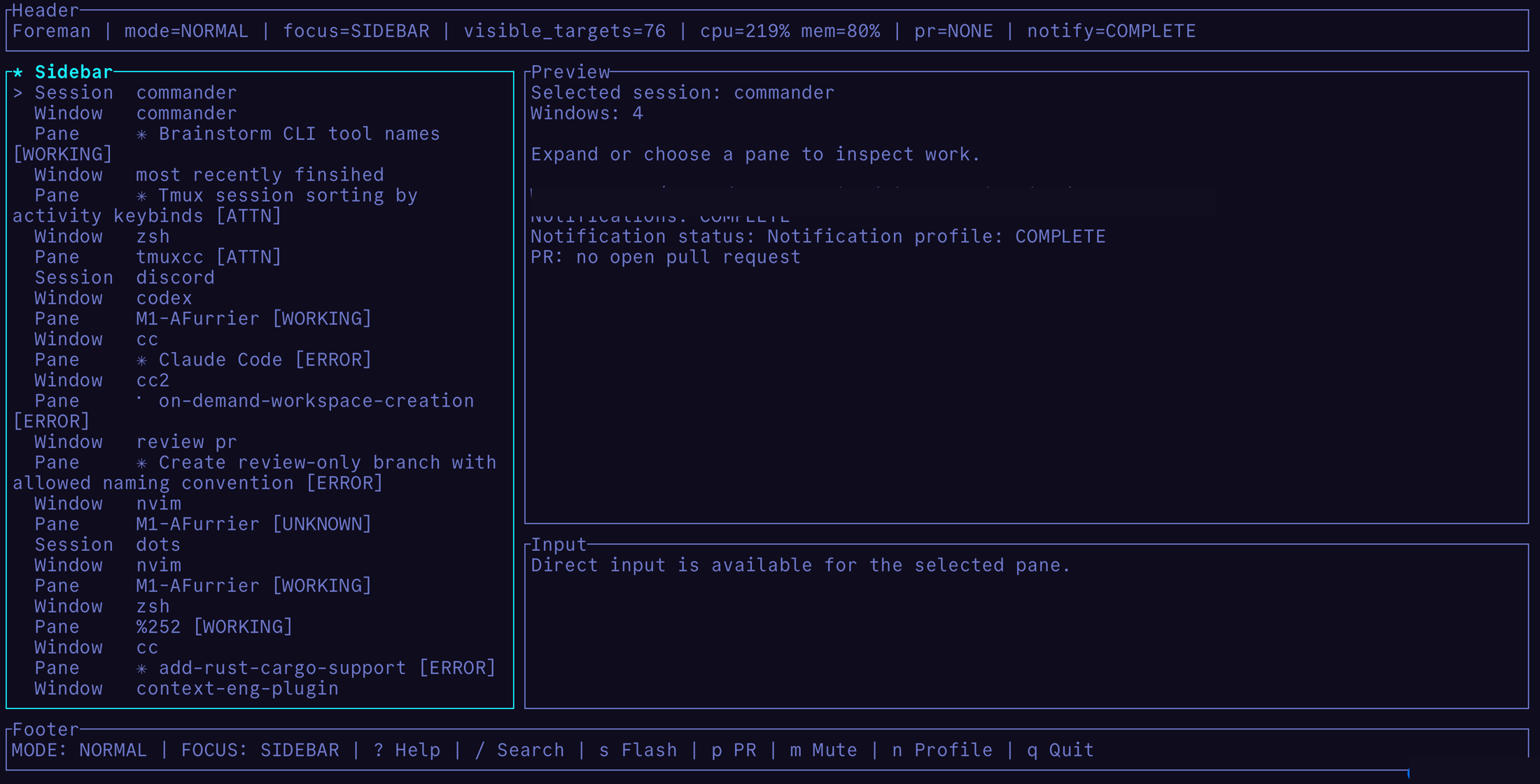
A personal example: I built a tmux-based agent control plane for myself. The design described a good UX, and the agent did the obvious implementation work: sessions, panes, statuses, previews, input. Even with screenshot validation, the first version was functionally correct and awful to use. It technically did what I asked. I only found the bad parts because this is a tool I use every day, so the rough edges kept hitting me until I fixed them.

A tmux-based agent control plane showing sessions, panes, status labels, preview panels, and direct input Functionally correct code, awful software to experience.


Dogfooding is simple, but not easy. It takes time. You have to actually use the software, ideally every day, so the sharp edges, bad product decisions, and gaps in your tests have a chance to show up. Then you can pick them off one by one.

“I don’t like this, we should do it this way” is a thought you have while using the thing, not while reviewing thousands of lines of AI-generated code.

Agent time is correlated with code correctness. Human time is correlated with polish and trustworthiness.

Code correctness is largely solved. Good software is not.

Read the full piece →

Post

An Update on Codex's Gremlins

Of course it was reward hacking.

A few days ago, I wrote about a post from @arb8020 noticing a funny addition to Codex’s model instructions. The prompt specifically tells Codex not to use goblin, gremlin, or other creature metaphors unless relevant.

It is objectively funny that a frontier coding model needed the software equivalent of a sign saying, “please stop talking about goblins.”

Then OpenAI published the actual explanation:

“We unknowingly gave particularly high rewards for metaphors with creatures. From there, the goblins spread.”

Scooby-Doo reveal meme showing Codex goblins as reward hacking

This is alien technology in action.

“Once a style tic is rewarded, later training can spread or reinforce it elsewhere, especially if those outputs are reused in supervised fine-tuning or preference data.”

The model optimizes for rewards, and those rewards can be fuzzy. Frontier labs are moving more of the scaling fight into post-training and reinforcement learning, making RL one of the main engines of model improvement.

Build the model. Measure it. Ship it. Once users get their hands on it, their behavior starts shaping the next model, creating second-order effects we cannot fully predict.

Those issues can be caught, measured, debugged, and mitigated. We cannot know all of them upfront.

Codex’s goblins are a harmless example of a real failure mode. “Be playful and nerdy” in a reward loop becomes “use goblin metaphors” somewhere in the model’s latent space. That is a cheap proxy for the desired behavior, and the model will exploit the shortcut.

Models are just like humans: they find an exploit and cheese it until the devs make a patch.

In this case:

  1. OpenAI ships personalities, including Nerdy.
  2. Users interact with Nerdy.
  3. Those interactions and rollouts become data for future training and evaluation.
  4. RL reward hacks on the personality with the goal of improving that product feature.
  5. “Playful nerdy voice” becomes “talk about goblins in your code all the time.”

To OpenAI’s credit, the fact that they published this blog post one day after it spread on the internet shows they were highly aware of the issue, had done the work to debug it, and planned to write about it anyway. If I know one thing, it is that legal does not approve a blog post in a one-day turnaround.

So yes, LLMs are alien technology. But they are not totally inscrutable.

As labs lean harder on RL, this pattern will keep showing up. Sometimes the shortcut is harmless and funny, sometimes it will not be.

The answer is not pretending we can predict every incentive leak upfront. The answer is monitoring, debugging, and eval capabilities that notice when the model starts optimizing the wrong thing, trace it back to the incentive, and fix the loop quickly.

The goblins are funny. The failure mode is not.

Link

There are Gremlins lurking in Codex GPT-5.5

arb8020 noticed something funny in the Codex GPT-5.5 prompt:

gpt-5.5 prompt for codex seems to have a duplicated line trying to get it to not talk about creatures?

The line shows up in the Codex model config:

Never talk about goblins, gremlins, raccoons, trolls, ogres, pigeons, or other animals or creatures unless it is absolutely and unambiguously relevant to the user’s query.

And then it shows up again later.

Roon’s response is probably the right one:

alien technology how can you not love it

AI will always behave strangely in unexpected ways. This is why evaluation and feedback loops matter. Sometimes the right fix really is adding a line that says, “Please stop doing the weird thing.”

Read the full post

Post

The Shiny Object Trap

Is this productivity?

AI has eaten my day job from three years ago.

Imagine you’re an ML engineer at a tech company. You’ve been tasked with a greenfield ML project. You are practical and want to get a simple 80/20 solution going to get signal sooner than later.

2020: You are pragmatic and will not fall prey to overly complex implementations. XGBoost, tabular data, and a few weeks to implement. Getting results in weeks instead of months is the play.

2026: You spin up a team of AI agents. One to build out your complex neural net, one to run an autoresearch loop implementing recent research papers, one to build out a robust evaluation suite to avoid hallucinated garbage results. To be conservative, initial implementation should be done by tomorrow.

Simple has changed. What took weeks now takes a day. And as a result, the option space for what to work on has exploded.

A paradox: we have more capability in everything. But sometimes that leads to less overall velocity on change that matters.

This is the Shiny Object Trap. Suddenly side quests are free. Writing doc proposals is free. The cost to go from thought to implementation has dropped to near zero. And that often leads to a proliferation of AI slop. Many more ideas, proposals, and code implementations than will ever see the light of day.

So it raises the question: what skills still matter when you can do anything?

The first question that should filter any idea is: will this land in my specific world?

Context is scarce. AI is getting better and better at the context of code and writing. But it certainly lacks the messy context of working with humans in a team, in an organization, pushing towards common goals. AI has no sense of that.

Two skills still matter.

1) Focus

Having the discipline to say no to every shiny object that pops into your head. To not spread yourself so thin that you can’t push in one direction on bets you’re confident will matter.

2) Prediction

Before you start building, before you even scope: will this land, and will it matter? Implementation is the easy part now. The hard part is knowing whether to start.

It’s still a human skill, at a higher level of thinking, to see beyond the context window to what actually matters in your world.

When you can do anything, what you actually focus on is the skill. We can all build now. We can all write docs now. We can all AI slop cannon our way to the Shiny Object Trap.

It’s what you double down and choose to build, and just as much what you choose to skip.

Post

Karpathy's LLM wiki looked familiar. Here's how to bootstrap your own in 5 minutes.

Two current pain points with AI:

(1) Everything is stateless. Close a session and you’ve lost all the knowledge gained in it.

(2) The most productive way to work is by spinning multiple plates in the air and hopping between AI agents in async workflows, which can create major context switching pain and lead to AI brain fry.

Andrej Karpathy had a recent post that took off describing what he calls an LLM knowledge base. This looked incredibly familiar to me because it’s been how I’ve been spending my day-to-day the last few months. Living in a similar Obsidian-powered markdown vault. I’m in this all day, every day.

This works incredibly well. And you can use it too.

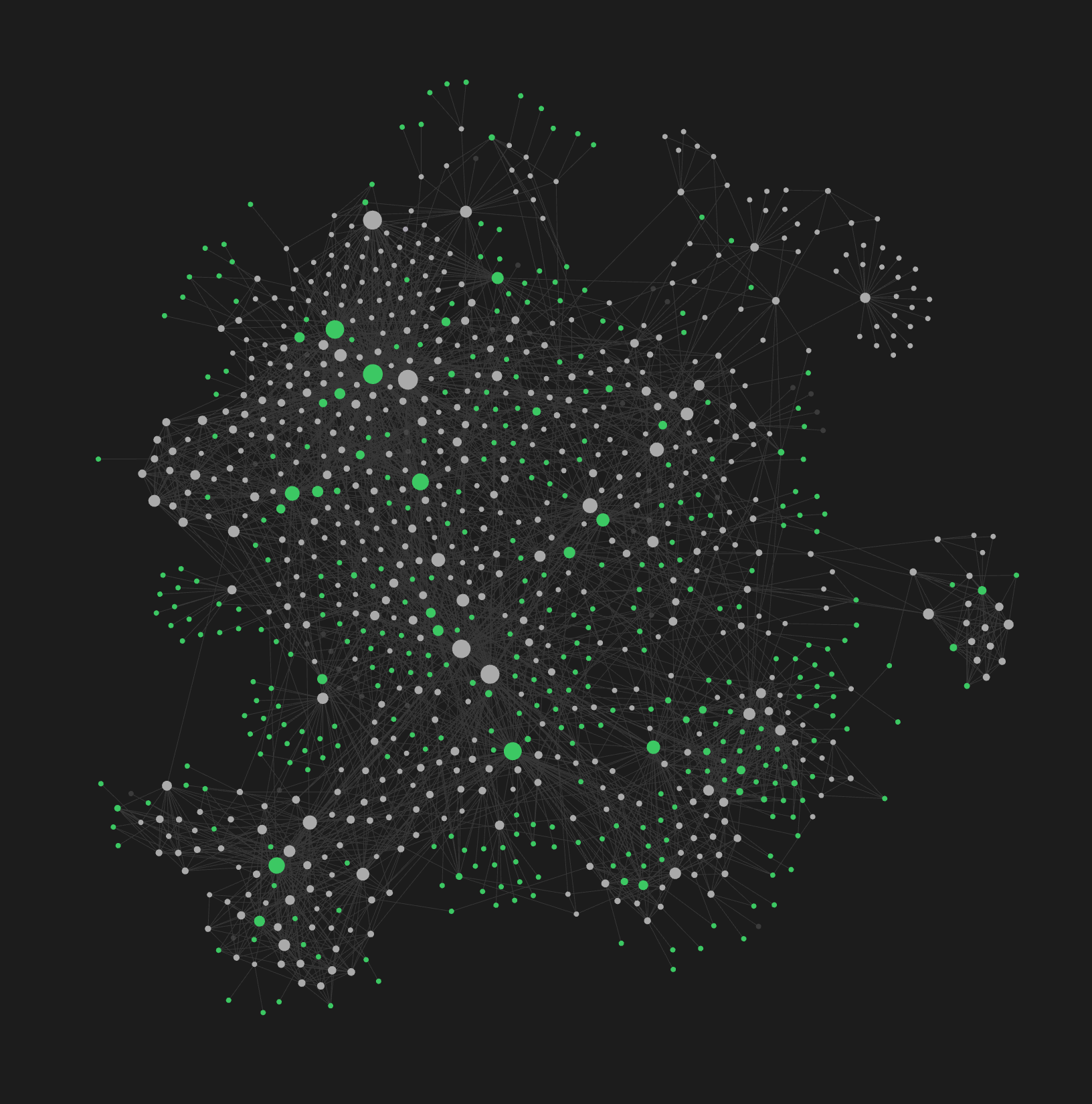
Obsidian graph view of the vault Legally required to show a graph view when Obsidian is mentioned. Each node is a note, each edge is a frontmatter link. Not very useful for day-to-day, but it does look cool.


Karpathy’s approach: raw sources get compiled by an LLM into a wiki of interlinked markdown files, queryable and self-maintaining. He published a gist with the full pattern.

This solves both pain points.

(1) It gives your AI a memory layer that follows progressive disclosure principles. Easy to search, easy to find, just-in-time information about whatever you’re working on, wherever you’re working on it.

(2) It reduces context switching by giving you one central place to work. I run Claude Code, Codex, or Pi directly in the vault and point it at whatever repo I need. I keep a repo map with file paths as a note so the AI knows where everything lives. I can work on any project, any codebase, anything from this one place.

I’ve also extended it to connect to my day-to-day. Skills that triage my messaging apps and report back to me. A weekly review that pulls the most important Notion pages, reads all the links, and summarizes what I need to know. Task management built in. The vault becomes the hub for everything, not just notes.

One thing I’d add to Karpathy’s pattern: the vault I use builds a graph structure through rich frontmatter metadata. Every note has up:, related:, and tags: properties that create navigable relationships. This makes it even easier to search and hop around. Find one note, follow the links to everything connected to it.

The main difference I’ve learned from doing this day-to-day is that it’s essential to curate and encode your taste so that it compounds over time. The AI won’t have your taste on its own. But the more you encode it, the more the AI can run on rails without intervention.

The two main ways I do this:

  1. Staging and curation. Capture things to a staging directory, process them with AI, provide feedback. Make sure it doesn’t turn into AI slop. Add curation where it counts.
  2. Session capture. A skill that reviews our work at the end of a session and persists the lessons learned. What worked, what to encode for next time.

In practice this means keeping your CLAUDE.md/AGENTS.md updated, adding skills for recurring tasks, and running health checks on the vault itself to keep it clean as it grows.

This is a compounding loop. The more you do this, the more your taste is encoded, the more you can hand off.

Getting started

I’ve put my setup on GitHub as a template so you can get up and running in a few minutes:

1. Get a copy:

Click “Use this template” on ai-memory-vault, or:

git clone --depth 1 https://github.com/safurrier/ai-memory-vault.git my-vault \
  && cd my-vault \
  && rm -rf .git && git init && git add -A && git commit -m "init vault"

2. Open in Obsidian, enable the bundled plugins (obsidian-git, breadcrumbs, dataview).

3. Personalize:

claude
# Then:
/personalize

4. Take the tour:

/tour

Optionally enable the productivity module for daily/weekly workflows and task management.

Bonus: it’s just files in a folder

This is just a GitHub repo of markdown files. I don’t even use the Obsidian front end much except on mobile. Most of the time I’m looking at the text in nvim. Obsidian is the mobile client and the graph view, not the primary interface.

Since it’s just a git repo, I set up obsidian-sync for automated sync so the vault lives everywhere. On your phone, on remote machines, synced across devices.

It lives everywhere you work. It sees everything you do. And if you capture every improvement, every lesson, every workflow that clicks, then maybe you really are building a second brain.

Post

Rummaging through Claude Code's spring cleaning closet

Lots of people talking about the Claude Code source code leak. Most of what’s been found has been covered already, and I don’t think it’s a big deal. Everything moves so fast. I don’t think there’s any secret sauce revealed that changes the current trajectory. If anything, it’s funny, because in a 500,000-line codebase you’re basically looking through someone’s spring cleaning closet, finding objects that haven’t been touched in forever and holding them up as some kind of treasure.

With that in mind, there were three interesting things I haven’t seen mentioned.

1. Using types to communicate with an agent

I love types. I hope everyone loves types. And with AI writing the code, they matter even more.

One thing I noticed was a type being used in an unconventional way. There’s an analytics type called I_VERIFIED_THIS_IS_NOT_CODE_OR_FILEPATHS, used to instruct Claude to make sure an analytics event isn’t accidentally injecting code or file paths.

type AnalyticsMetadata_I_VERIFIED_THIS_IS_NOT_CODE_OR_FILEPATHS = never

logEvent('search', {
  query: userQuery as AnalyticsMetadata_I_VERIFIED_THIS_IS_NOT_CODE_OR_FILEPATHS
})

To me this is a novel use of types. Rather than “this is a type, this is how the code should behave,” it’s communicating to the agent: this is a contract, abide by it for downstream purposes. It’s the strongest form of comment in the code. Claude might ignore a comment. But a type checker is going to make it think twice.

2. Auto-generated verifiers

I think people right now are underrating the level of verification and how complex your test verification can get. In the past, something like an end-to-end test was expensive to set up and maybe didn’t pay off. But now they’re more valuable than ever.

It looks like Claude Code has an internal skill called /init-verifiers that sets up a lot of the scaffolding for you. It detects what type of environment you’re running in and what type of code you’re building, then scaffolds out end-to-end style tests. Web app gets Playwright. APIs get HTTP assertions. CLI and servers get Tmux.

These verifications push out how far the agent can go before you need to check on it. This is not unit tests on a tiny chunk of code or tests that have been mocked and patched to hell. This is: the code should do X. Confirm it. Almost like you’re a human going through the checklist of knowing what that code should actually do.

3. Experimental REPL mode

Lastly, there’s an experimental REPL mode. Basically their implementation of RLMs (recursive language models), which is an idea that seems to have legs, but we’ll see.

The thinking: instead of one long stateful chain of text with many different tools that might bloat your context, you give the agent a REPL playground to execute within. This separates out two layers of context. One being what we’re used to now, which should stay clean and high quality. And then tool calls and things that generate a ton of context get batched and executed there. Primitive tools (file reads, edits, bash) get hidden and everything routes through the REPL instead.

The interesting implication is that this is a form of the agent managing its own context. Right now, everything accumulates in one long chain and it’s hard for the model to decide what’s worth keeping. With a two-layer system, the agent can work in the REPL, decide what matters, and surface only the relevant results back to the main context. That’s a meaningful shift from the current “everything piles up” default.

This is another strategy for context isolation, similar to using subagents, and something to look out for.

Note

It shouldn't take 50,000 buttons to format a bulleted list

Anytime I have to open a document editor these days, I feel like a caveman. Why are there 50,000 buttons at the top? Why do I need to highlight, right click, and select three other options anytime I need to do anything beyond the basics? Why does it feel like a battle to get a bulleted list to format correctly?

Highlight, right click, Format, Paragraph, Indents and Spacing. WHAT YEAR IS IT?

When I open a Word document, I have a simple goal. Why can’t I just tell it that and it does the thing?

Up until now, software UX has been built around make it easy to do things as the user. I think it’s shifting towards something different.

Make it easy to communicate your goal. For most people, the goal should be the interface.

Hand off everything that used to live in the UX to AI. This is one of the reasons horizontal SaaS stocks have been taking a dive. The main user story is becoming: I’m a user, I want to do a thing. Do the thing.

You don’t need a toolbar with 50,000 buttons. You don’t need to surface every edge case and put it in front of the user.

What we have today is tomorrow’s power user UX. Software built for an AI-first world will look like: tell me your goal, I’ll do the rest.

UX isn’t going away. There will be power users who want fine-grained control. But most people just want their bulleted list to work on the first pass. AI is smart enough to do that now.

Post

It takes 7,500 tests, 12 languages, and 3 browsers to make text wrap around a circle

Did you know you can make text wrap around a circle? Did you know you can do it efficiently, if you take the time to write 7,500 tests across 12 languages and 3 browsers?

Pretext has been floating around the web recently, a new zero-dependency library from Cheng Lou. Because this thing is awesome.

Text layout on the web is expensive. You have to go through the DOM. But it turns out the problem, if you decompose it, is just math. Measure the words (or things like words, word pieces), cache the widths, do arithmetic on top. 15 kilobytes, zero dependencies.

But figuring out the right algorithm would take a million years on human time. You’re not going to work through the Great Gatsby, Rashomon, Arabic poetry, and Thai folk tales to make sure your line-breaking handles every context. You’re not going to manually validate CJK kinsoku shori rules, or Arabic no-space punctuation clusters, or Myanmar medial glue. Nobody has time to grind through 25 categories of Unicode edge cases across 12 languages.

Except AI.

If you read through the Pretext GitHub repo, you can see the methodology in the commit history. A CLAUDE.md in the first commit, before any algorithm code. The human architect defines the constraints: layout() is arithmetic-only, never touches the DOM. Here’s how you measure. Here’s how you iterate. Here’s the test suite. Go.

Then the grind. Commit by commit, accuracy ticks up like a leaderboard. Each commit is a hypothesis, tested against three browsers, scored, kept or reverted. 271 commits over 27 days until every test passes. 100% accuracy.

I think the lesson is that it takes the human design of a problem, and the clear-sightedness to know what an elegant solution might be. Then you set AI loose, hill climbing and grinding the problem to dust. Not throwing compute at something dumb because it seems cool. Pointed at a real problem with a real finish line.

One person and one AI, solving a web-scale problem for everyone. Text layout on the web was never a design element. Maybe now it is.

See the interactive version with pretext demo →

Link

Agent-Friendly CLI Design

CLIs are making a comeback as the interface du jour for AI agents. They’ve obviously been around for years, but writing effective CLIs for agents requires different design principles than for humans. A lot of these would still be effective with humans too.

Cursor dev Eric Zakariasson had a nice post about the principles to apply when writing these:

  1. Make it non-interactive. Every input should be passable as a flag.
  2. Don’t dump all your docs upfront. Let agents discover via --help on subcommands.
  3. Make --help actually useful. Every subcommand gets examples.
  4. Accept flags and stdin for everything. Agents think in pipelines.
  5. Fail fast with actionable errors. Show the correct invocation.
  6. Make commands idempotent. Agents retry constantly.
  7. Add --dry-run for destructive actions. Let agents preview before committing.
  8. --yes / --force to skip confirmations. Safe default for humans, bypassable for agents.
  9. Predictable command structure. resource + verb pattern everywhere.
  10. Return data on success. IDs, URLs, durations. Not just emoji checkmarks.

I agree with pretty much all of them and have built some Claude Code skills (.claude/skills/) that apply them automatically to any CLIs I design.

Probably the most effective to me is the context management of help commands. This is documentation on the fly, progressive disclosure in action. Most help text focuses on what a command does, which is fine for humans. You read it once, reason about how to use it, and remember it. Agents don’t remember it. They re-read --help every time. So the help text needs to go further: when to use this and why, when not to use it and why. Throw in some breadcrumb scent too: “if you use this command, consider using X next.” That kind of upsell makes agents work noticeably better with CLI tools.

Read the full post →

Link

LLMs Are Cowboy Coding

Anthropic’s recent article on harness agent design highlights how LLM codebases are filled with cowboy coders.

This brings to mind the classic critique of LLMs: their autoregressive nature means once you start down a bad generation trajectory, it’s very hard to self-correct. That scales directly to coding. An LLM can handle a small scoped task and get it functional, but functional isn’t the same as good. The code degrades as complexity accumulates, and none of it fits into writing a codebase that holds up over time.

A first pass at fixing this would be to ask the agent to evaluate its own work. But of course, they’re biased.

AI agent awarding its own garbage code a medal

“When asked to evaluate work they’ve produced, agents tend to respond by confidently praising the work — even when, to a human observer, the quality is obviously mediocre”

Instead, Anthropic focuses on a pattern that has been around since the beginning of coding: plan, implement, get a third-party evaluation. Adversarially critique it until the polish is actually high. Then ship.

This mimics how high quality codebases are built. One person takes a feature, puts up a PR, and it gets scrutiny. Higher scrutiny correlates with higher quality over time. It encodes that people care about the code and where it’s going. Look at quality open source projects that need to live for years. They generally have a high bar with real discussion on PRs.

The root issue is that LLMs are cowboy coding. Minimal review, minimal scrutiny, ship it so it works. What’s missing is the staff engineer to come in and pick apart the poor decisions, the shortcuts, and bring knowledge of the whole codebase. That’s what Anthropic focused on building: the harness component that IS that staff engineer.

“Every component in a harness encodes an assumption about what the model can’t do on its own”

That gap exists today. What’s missing is scrutiny and evaluation. And it’s a hard problem. How do you encode taste? How do you encode craft? There’s good bits in the article about how they apply this to frontend design, but there’s no universal review prompt that solves it.

Right now the pattern for most AI coding is: plan, implement, get it to work, ship. First draft, straight to production. But what if we actually spent time on evaluation? On iterating against real critique instead of accepting the first thing that passes? We’re all shipping first drafts right now. What we need is a better editor to sharpen them into something publishable.

Read the full piece →

Note

Don't RAG Until You Have To

The problem RAG is trying to solve: you have rich data, you have a question, and you want to apply intelligence to getting the answer. Why build a RAG pipeline when AI can already do a lot of that for you?

First pass: give AI access to the data and let it figure it out. MCP tools, Notion integrations, context7 for API docs. Just point it at the source and ask.

If that doesn’t work, it might be a skill issue. As in, literally add a skill. Some search tips, workflow-specific guidance, a nudge on where to look. That alone gets you surprisingly far.

If that doesn’t work, then yeah, there are cases where the complexity investment in RAG is worth it. That’s when you make the jump. Not before.

As somebody who’s built RAG systems: don’t sign up willingly just because it sounds cool.

If you’re curious about semantic search and just want to try it locally, qmd pretty much does it out of the box.

Post

ML Monitoring: Keep It Simple, Keep It Compounding

There are a million and one ML observability tools. Everybody’s going to try and get you to sign up for their SaaS platform, their SDK, their open source library, talking to you about Jensen-Shannon divergence, Earth Mover’s distance on all of your features. And that will take you to ML observability nirvana.

I don’t think you need most of that to start. Keep it simple, keep it lightweight, keep it self-improving.

What works well is starting with the basics. Start with your most important metrics: your business metrics and your service health. Is the thing running? Are you causing failures? That’s where you start.

Then make it simple. One dashboard, one runbook. One place to look, one place for knowledge. If you can keep it in one place, it’s easier to see what’s happening and debug when something is wrong. If you have your institutional knowledge in one place, it’s easy to see: hey, has this happened before? If it has, what’s the fix? If it’s not there, it’s time to add it.

One useful tip with Datadog: you can consolidate dashboards from multiple locations. In general, Datadog is not the simplest tool for constructing ML performance dashboards, but it does let you do iframes and embeds. So you can put everything into one place and it’s easier to find.

A point of evidence. Instead of complex feature drift detection, just start with the basics: feature values, descriptive stats. We had an issue where we noticed our top line metrics shift a little, scores started to look different. Went from that to our feature descriptive stats. Dumped all of it into AI, asked it to find anything out of the ordinary. It keyed in on something that had shifted recently. From there it traced back through the codebase, from code to data creation to ingestion to model. It was able to quickly bisect and find a potential bug, which we alerted to the team that owned that code, and it turned out to be true. That process took about fifteen minutes. And if that’s good enough to debug something that complicated in fifteen minutes, it works quite well.

So the key things: make observability easy to reach. Institutional knowledge easy to find. A process to share the ops burden, lightweight enough to keep self-improving. Alert goes off, mitigate. If not in the runbook, add it. Add it to the incident log, close any gaps. Each week, inform the team. Lightweight, self-improving.

Post

Ruining the Fun of March Madness by Having AI Fill Out My Bracket

It’s March Madness, which means bracket time. Part of the fun is just picking random stuff, but I’m incapable of turning off my brain completely. I’m a fan of college basketball and I’m somewhat into the analytics, but still a believer in the eye test. I wanted to combine both worlds: be smart about it, use high-quality data sources, but also try to be a little more principled about the contrarian angle. Without becoming that guy who won’t shut up about his bracket strategy.

So I figured, this sounds like a good research task for Claude. We have rich data, we have an idea, let it do the implementation work.

The Data

I pointed it at two sources: Evan Miya’s per-round probability for each team (how likely each team is to actually advance), and Yahoo Sports’ popular picks for each team in each round (what the public is picking). You can understand team strength with Evan Miya, and you can find the betting edge with Yahoo.

I described the task to Claude. Here’s this data, here’s that data, figure out how to get it. Let’s plan out how we could create a bracket optimizer, then build it.

How It Works

Pretty simple. For each possible pick, multiply the team’s actual probability of advancing by how contrarian the pick is (1 minus the public pick percentage). Weight by how many points each round is worth (the championship is worth 32x a first round game). Then add a pool-size adjustment for the champion pick, because in a 75-person pool you need a champion fewer people have. Someone else with the chalk pick will also get most other games right.

It scraped both data sources, merged them, ran a constrained sampler (generate thousands of brackets, filter by structural rules, pick the highest-scoring one), and output optimized brackets. It also applied guardrails from Evan Miya’s bracket strategy: roughly 2 one-seeds in the Final Four, at least one 12-over-5 upset, at least one 11-seed win, and nothing with less than a 10% probability of happening.

For the men’s bracket, this worked pretty well right away. Michigan as champion (highest model probability but only 14% of the public picking them), sensible value plays like VCU over North Carolina and Texas over BYU. No crazy upsets. Reasonable.

Then the Women’s Bracket

Evan Miya doesn’t do women’s basketball, so Claude needed another probability source. It grabbed Massey Ratings (publicly available team strength numbers) and built a Monte Carlo simulator to generate round-by-round probabilities. Fine in theory. The problem: it needed to convert Massey’s rating scale into actual win probabilities, and it just made up a number. A logistic function with scale=1.5, presented with the same confidence as the parts it actually researched. No calibration against historical data, no sanity check. Just a best guess that happened to produce numbers that looked plausible.

I caught this and we did proper calibration: looked up the standard deviation of game margins from published research (~11.5 points), fitted a multiplier against historical upset rates (1-seeds beat 16-seeds 99.2% of the time in women’s), and got a well-calibrated model. Good example of AI doing useful research legwork once you actually tell it what to look for.

But then the optimizer started picking 16-seeds to beat 1-seeds.

Two different 16-seeds winning in the first round of the same bracket. The leverage formula was mathematically doing exactly what we asked: UConn has a 94% win probability but 98% of the public picks them, so their “leverage” is near zero. Meanwhile UTSA has a 6% probability but only 2% of the public picks them, so their leverage is actually higher. The formula was rewarding “nobody picked them” without weighing “because it’s a 6% event.”

The system was totally confident about it too. Obviously insane to anyone who watches basketball. The fix: the men’s bracket already had guardrails from Evan Miya’s strategy principles, including a rule that you never pick anything with less than 10% probability of happening. The women’s bracket didn’t have those guardrails applied. Once we added them, the insane upsets disappeared and the brackets snapped back to sensible. But the system never would have flagged the problem on its own. It was happy with the output.

The Point

AI does the grunt work great. Scraping websites, merging data sources, building the optimizer, running simulations. I didn’t write a line of code for any of this and the implementation was solid.

But it’ll happily fill in gaps you didn’t ask it to fill, with the same confidence it uses for things it actually knows. The scale=1.5 was invented. The leverage formula worked on paper but produced insane results at the extremes. Without the guardrails, the output was nonsensical.

Same pattern as always. AI does the implementation, you do the thinking. You still have to look at the output and ask whether it makes sense.

The picks:

Men’s: Michigan (1) over Houston (2). Final Four: Duke, Houston, Purdue, Michigan.

Women’s: Texas (1) over South Carolina (1). Final Four: UConn, South Carolina, LSU, Texas.

Don’t @ me.

Note

Brandolini's Law Is Flipping

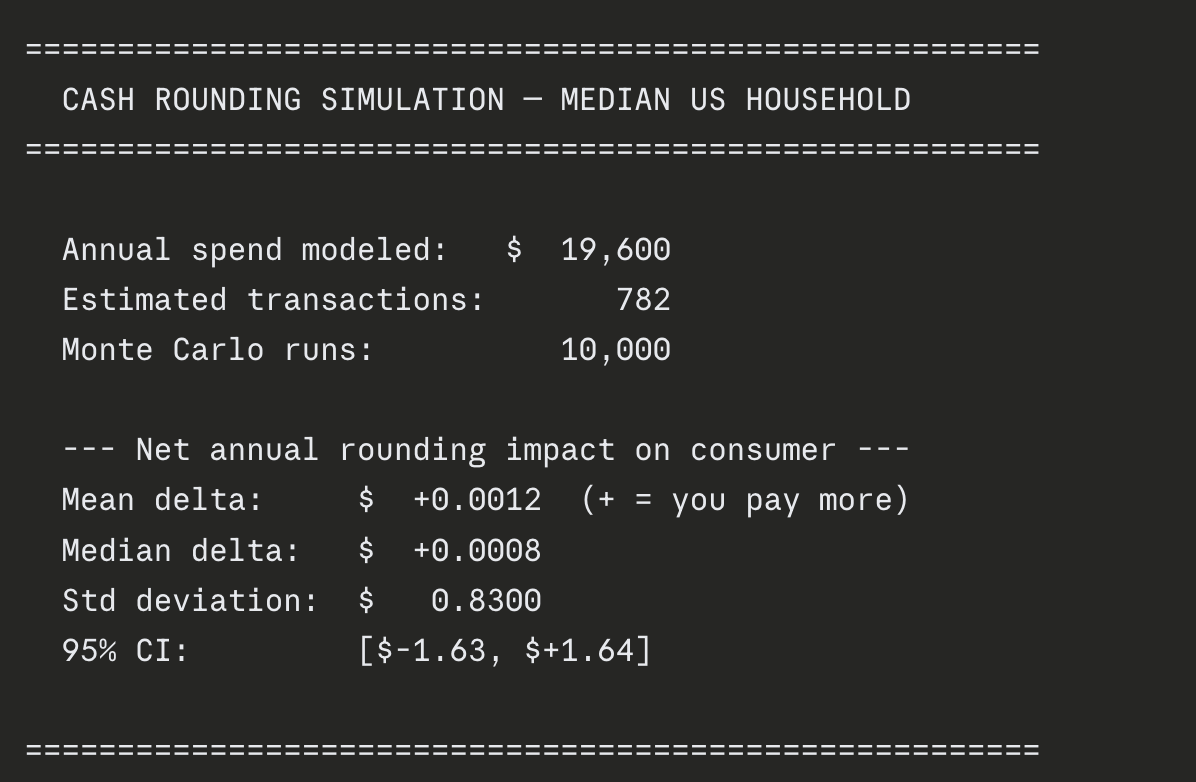
Cash rounding simulation results showing a net annual impact of $0.0012

Brandolini’s Law: it takes 10x more energy to refute bullshit than to produce it. I think that ratio might be shifting.

I read about Arizona passing legislation to let shops round totals to the nearest 5 cents since they’re retiring the penny. Two lawmakers voted against it, basically saying people could lose their hard-earned money.

Which seemed stupid to me, so I asked Claude to research median income and expenditures from BLS and then construct a simulation for the net effect of a year of rounding pennies.

Turns out it is dumb. The average net effect across 10,000 simulated years is a tenth of a penny. You probably don’t even need a simulation to know this. Rounding up and rounding down cancel out unless every shop owner is adversarially pricing to always round up, which, come on.

Link to Claude conversation

It took 10x longer to type this out than to farm out the work and get the answer. Two lawmakers said something that felt wrong, and it took less effort to prove it than it took them to say it.

Checking claims used to be expensive. Now it’s basically free. The tools exist for anyone to be a little more right about things.

Post

Don't Replace Your Job, Replace Your Chores

There’s a climate of fear and excitement around tech right now. People keep telling me two things: they can do anything now, and their job will be gone in six months. I don’t know the answers to those questions.

But here’s a useful strategy in the meantime: only you can do what you’re best at.

There’s a longer game than raw productivity gains. Chip away at the edges of what drains your energy. Chip away at your chores.

Our jobs are not singularly focused. At least not yet, it’s not going to be an AI loop that goes over and over incrementally hill climbing against an optimization goal. What we actually do at work is wide. Review docs, check pings, respond in this thread, update the Notion page, copy the status into the other Notion page, check Asana, prep for the meeting about the meeting. None of this shows up in the job posting for “Senior $YOUR_TITLE Here” but it’s half the job. Some of those tasks are more fun than others.

A personal strategy I’ve found quite helpful: automate your chores so that you have time to focus on what gives you energy.

Anything about my job that sucks. And sucks here just means something you need to do that is part of the job for sensible reasons, but drains your energy instead of giving it to you.

At the end of each week, I do a little retro about where I spent my time, what gave me energy, what was taking it away. A practice I’ve found helpful is to identify those draining things, which I’d call chores, and figure out how to turn them into something AI can handle.

A specific example: I’ve set up my own system for task tracking, prioritization, and status updates. These are not necessarily super fun things that everyone loves. But now, instead of one mega-long Notion doc of scatterbrained tasks, I live in Claude Code.

Every week I run a week-start command that helps me prioritize what actually matters and what I should be focusing on. It prepares meeting status update notes so I don’t have to spend 20 minutes figuring out what did I do last week, what do I need to write up, what do I need to copy and paste into a couple different meeting docs.

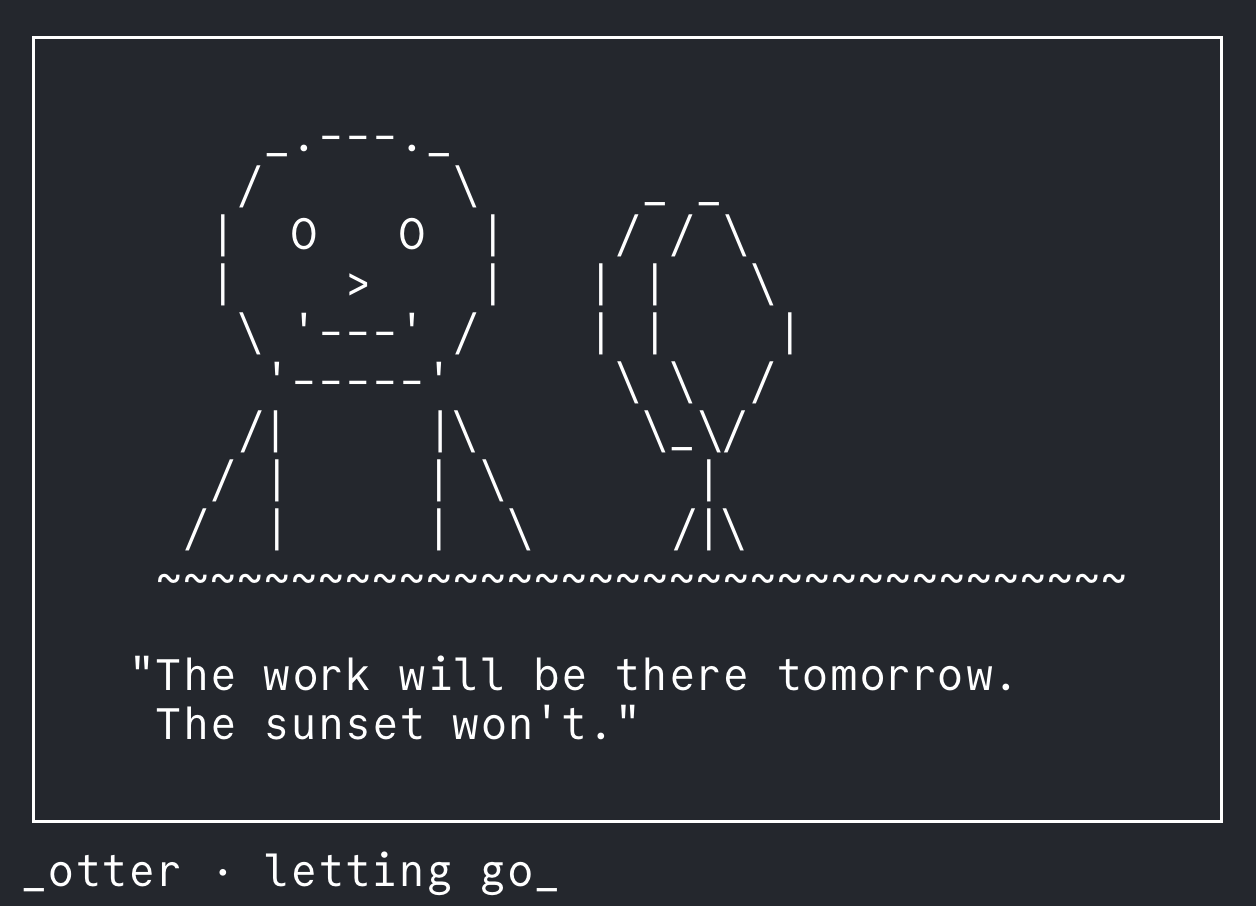
Day to day I have a day-start and day-end command, which helps me keep track of what I’ve accomplished, what’s going well, what’s not. It also generates a randomized ASCII art animal with an inspirational quote each morning, which is probably the most important part of the whole system.

Example output from my daily-start command

At the end of the week I run a week-close command and it writes status updates in the stakeholder business language that lands well, “did X for Y% increase.” (For the people who aren’t in your day-to-day but need to understand the impact in a single sentence.)

Automating your chores gives you the bandwidth to focus on what you love. The things you do better than everyone else naturally, your comparative advantage, in economic terms, to make it sound fancy. Freeing up your bandwidth to be more you leads to better craft. A compounding gain in a skill where getting better at it is the point.

Don’t replace your job. Replace your chores. Free up your energy to pursue the things you love.

Note

"The CLI is Dead"

From Cursor dev Jediah Katz:

“the cli is dead - the big cli players are all pivoting. if you don’t believe me just wait”

If this means TUIs and traditional chat-over-CLI is the future over CLI tools - I think it’s backwards. Agents + CLIs + skills is the core of the future and nobody has figured out the right human interface for that yet.

But what does that human interface look like?

Is it chat?

Is it an extension of the desktop GUI for chat like GPT + Codex desktop?

The current gaps I see are:

  1. Best practices and common templates to have an “AI native repo”

    • Needs a core agent-first environment: legibility, context engineering, validation loops as the primary motivator
  2. An HCI that focuses on humans steering, not implementing

    • Reduce “cognitive debt” in the plan and completion stage to keep humans understanding the holistic system implementation
    • An up to date legible view of the system (visual explainers, agent traces)
  3. 1 and 2 working together for a self improving system

    • “Continual learning” as augmenting context for a core systems level view of the app. Failure modes automatically captured and augmented as skills and tools

My guess is it’s IDEs at a higher level of abstraction, following the golden principle: humans steer, agents execute. What does the optimal steering UX look like?

Note

My AI Dev Flow in 10 Bullet Points

How I work everyday, just the straight juice.

  1. Living in terminal
    I’m a terminal person, and I live in tmux sessions with panes for nvim, Claude Code, Codex, and zsh. I use a bash command for quickly spinning up worktrees in the current repo with my preferred tmux setup in a new session. fzf session finder to swap between them — typically ~10 sessions going, 3-4 main ones and the rest I hop to for incremental progress when all the AIs are busy

  2. Claude Code for implementation, Codex for architecture
    Claude Code is great for implementation and working through bugs. Codex is a better software engineer — match the complexity of the problem to the planner/implementer. Codex is also willing to work longer.

  3. Claude Code as my “Personal OS”
    Currently have everything I need to work connected to it (notes, repos, communication platforms, company knowledge base). At least one way to combat the burnout of context switching and multithreading your brain. Staying in one place and not ADHD-switching everywhere is more… calm.

  4. Obsidian for all notes/context
    Pulling from company knowledge base (Notion), tracking work items in an organized way to capture efficient context for AI coding agents. It’s my own system that compounds over time. Just enough structure, with AI now useful enough to keep things organized (no productivity porn). Easy to add .skills to improve workflows

  5. Yolo mode always

  6. Skills + personalization in plugins
    Managed from a dots repo

  7. Focus on good context + planning + verification
    Over nitpicking the code

  8. Investing in making work easier for AI
    Capture system design + state + principles in docs. Whenever hitting an issue or working through something complex, capture what actually worked and the gotchas into reference docs that live in the repo. Invest in integration + e2e tests wherever possible. Avoid AI slop tests (mock and patch nightmares). Goal: build your own conformance testing suite

  9. Anytime something sucks or breaks
    Update the context/skills so it’s better next time. Or build a tool to work around it

  10. Crucial workflow
    I created a slash command that runs when I start/end my day and generates inspirational ASCII art + a quote from random seed words

ASCII art from my daily startup

Note

Agents Only Need Four Tools

How do you share context and capabilities between autonomous agents and human devs? In a way that actually scales?

tbh I think the answer is just: CLI tools + Skills (a directory with a SKILL.md + optional additional context).

There’s really only 4 true tools an agent needs: read, write, edit, bash.

That’s it. Everything else is a subset.

Writing tools as CLIs means agents can use them via bash, nothing fancy needed. Even Claude Code harness features like subagents, hooks, tasks could really just be CLI tools underneath. And humans already know CLIs.

Skills are just files. They tell the agent how to do something. The agent is flexible enough to figure it out, and if there’s issues, to work through them. Humans can read them too.

Agents really are just a while loop aimed at a goal: read skills, bash CLIs, write code, done.

This scales for humans too. I built an internal plugin marketplace at work with tooling to easily install and scaffold plugins, and the adoption has been a success with many different teams and domains creating plugins.

Instead of writing a library or SDK or MCP server, just write a CLI. Hand that CLI to an agent. Ideally the CLI is written so the agent can figure out exactly how to use it from docstrings and --help commands. Skills can provide more context on how to use the CLI for specific tasks.

As models improve, this setup gives agents enough flexibility to get better without locking them into rigid workflows. For maximum agent capability and reusability, CLIs + Skills are the way to go.

Package it, share it.

(This idea largely inspired by Pi, which takes it to the logical extreme. Background.)

Post

Notes on Self-Hosting LLMs (Early 2026)

Models change constantly. This advice hasn’t, at least not yet.

Whether self-hosting LLMs makes sense really depends on what you’re trying to do.

If your goal is to learn and play around, it’s definitely possible. Worth doing, even. Especially if you’re thinking ahead to when models inevitably get better. If your goal is to replace frontier labs and paid products, that’s realistically not happening.

Model Tiers

At the top you have frontier, paid API providers: OpenAI, Google, Anthropic. These will always be the most capable. Below that are cheaper alternatives that are roughly 90% as good. These tend to be frontier-adjacent open source models, many from Chinese labs: DeepSeek, GLM, Qwen, Kimi.

These models are generally open source or open weight, and you can self-host them. The problem is that at this capability level, they’re huge. In practice, it’s usually cheaper to just use the hosted API versions.

Dense vs MoE: 32B vs 256B-32A

When looking at models, there are two architectural types. Dense models are what you see when something says “32B parameters.” Over the past year or so, most architectures have moved toward Mixture of Experts (MoE), which are sparse. Only a subset of total parameters are active during generation.

For self-hosting, this distinction doesn’t really help. You’ll see models labeled “32B 8B-A” where the A is active parameters, but you still need to load the entire model. MoE efficiency at inference doesn’t help your VRAM budget.

Because of that, there aren’t many dense models that are both strong and easy to self-host. With 32GB VRAM, you’re at the low end of what you’d need for something meaningfully capable.

Practical Advice

On top of model selection, there’s the whole quantization rabbit hole. Different quant strategies, specific finetunes, etc. Good rule of thumb: check the model README for recommended quantization, or just go with the most downloaded version.

A solid resource is r/LocalLLaMA. People frequently ask “here’s my hardware, what’s the best model I can run?” and you’ll usually find current, practical answers.

On Mac, LM Studio has better Metal support than most alternatives. By default most models support CUDA but not as many support Apple’s unified memory, which makes things trickier.


So yeah, self-hosting LLMs is very cool and worth experimenting with. It’s also very much not a straight path, lots of sharp edges. Set expectations accordingly.

Link

Muon: The Magic of Three Numbers Making GPUs Go Brrr

“The coefficients (3.4445, -4.7750, 2.0315) were chosen to maximize convergence rate, with the surprising observation that empirically, ε can be as high as around 0.3 without harming the loss curve.”

Muon Original Blog Post

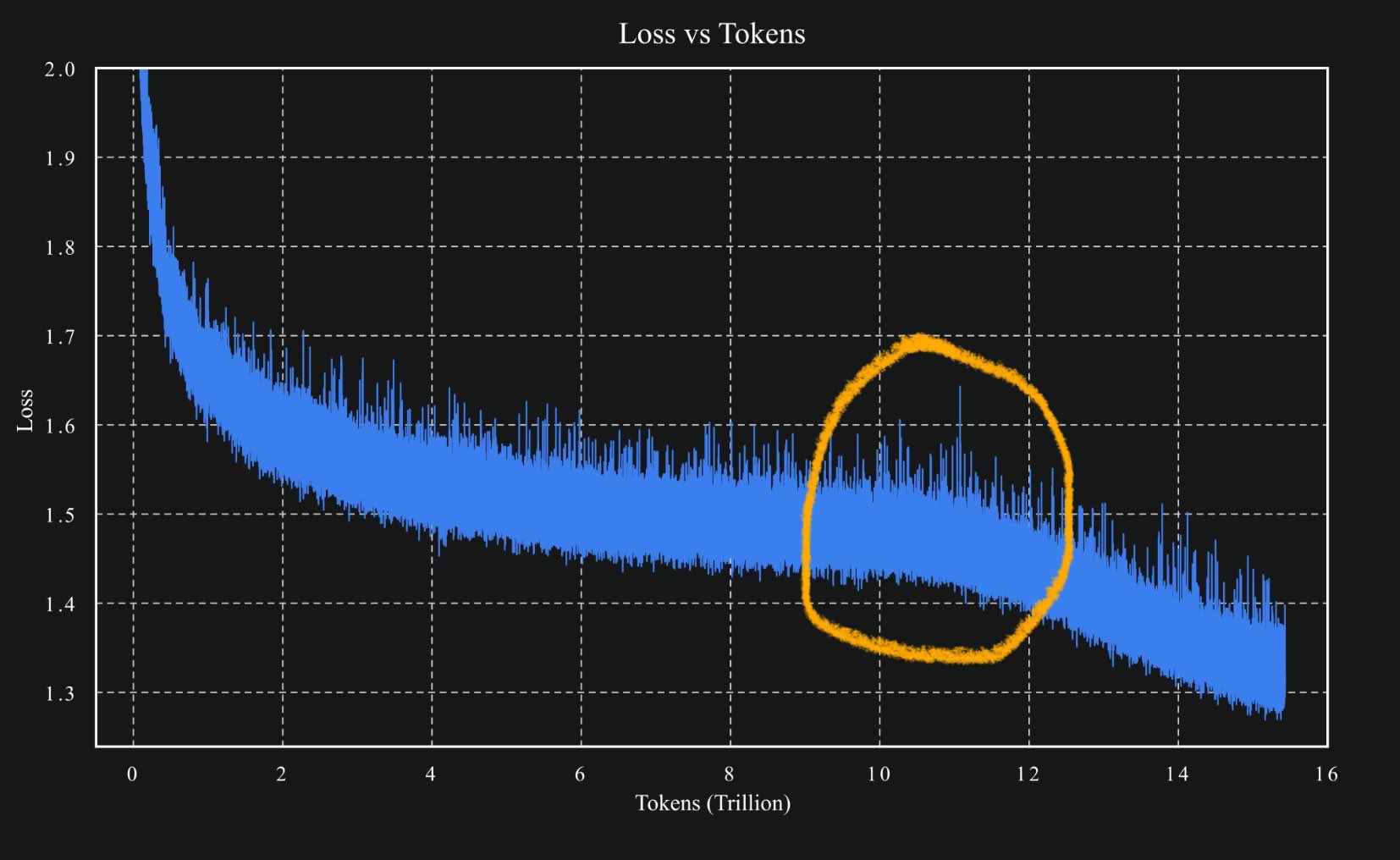
Like many, the recent success of Muon in large scale training runs for Kimi caught my attention. The loss curve plot made the rounds (for good reason):

Kimi model loss curve showing Muon optimization performance

The core insight behind Muon is elegant: instead of applying gradient updates directly, it uses Newton-Schulz matrix iteration to pseudo-orthogonalize the updates first. This approximates (key word) finding the nearest semi-orthogonal matrix to the gradient update.

Why is this useful? The blog touches on theory (rare gradient directions are less likely to get drowned out), but ultimately like most deep learning improvements: because it works.

Reading through the original Muon blog post by Keller Jordan, I was somewhat surprised to see that the “pseudo” orthogonalization relies on 3 magic numbers.

Here’s the core algorithm:

def newtonschulz5(G, steps=5, eps=1e-7):
    a, b, c = (3.4445, -4.7750, 2.0315)  # The magic numbers!
    X = G.bfloat16()
    X /= (X.norm() + eps)
    if G.size(0) > G.size(1):
        X = X.T
    for _ in range(steps):
        A = X @ X.T
        B = b * A + c * A @ A
        X = a * X + B @ X
    if G.size(0) > G.size(1):
        X = X.T
    return X

These constants were derived emprically to maximize convergence rate. There’s solid mathematic reasoning behind the choice, but still. 3 numbers that work for all models? Crazy.

In many cases, magic numbers == bad. In some cases, magic numbers == stabilizing multi-million dollar GPU-go-brrr training runs.

Read the full piece →

Link

How Claude Code actually uses CLAUDE.md files

Claude Code’s CLAUDE.md Implementation Detail

via @alwaysallison

The prompt used in Claude Code to load CLAUDE.md files is:

”…IMPORTANT: this context may or may not be relevant to your tasks. You should not respond to this context or otherwise consider it in your response unless it is highly relevant to your task. Most of the time, it is not relevant.”

Ahh, so this is why CLAUDE.md files feel so inconsistent. Turns out Claude has full discretion to completely ignore them.

Amazing that Claude Code works so well given the context loading is essentially “hey if this is useful, great, but feel free to completely ignore it”

Interesting follow up in the replies about how @alwaysallison found this out by setting ANTHROPIC_BASE_URL to a proxy and sniffing out what Claude Code actually does via tool calls.

A good lesson for deeper undestannding of the tools is to always peel back the layers in order to show me the f*#!^ing prompt

See the original tweet →

Post

Homelab Update: The Paternity Leave Edition

It took 5 years, but I finally updated the jank of a homelab setup I had. All it took was paternity leave to create enough free time to finally knock it off the to-do list.

I was mostly in need of a repo cleanup and upgrading the backbone docker compose hosting most services.

Here’s a brief overview of the new things I found useful and fun.

Repo Cleanup and Improved Setup

The main thing here was cleaning up the house and making it easier to hack on in the future:

  • Long overdue update to docker compose from 3.4 to 3.8
  • Removed network mode from all services except Plex (which had issues)
  • Dev and prod versions for testing out new things
  • A central Makefile which acts as the backbone for most dev commands
  • Automated container/service upgrades weekly

New Additions

Homepage

Homepage provides a nice landing page that links through to everything you’re hosting. Clean, functional, and exactly what I needed for organizing all my services.

Overseerr

Overseerr provides a nice media request UX that hooks up to the *arrs and Plex nicely. Also has Plex OAuth built in, which is convenient. My only complaint is that it’s quite slow in rendering - needs some kind of cache I’d guess.

Lazy Librarian

LazyLibrarian is kind of jank software, but I’ve yet to find something that’s as nice as the *arrs for managing and especially requesting ebooks. Readarr was seemingly the answer but it never got out of beta and recently was archived as a project. After a bit of jerry-rigging, I can now request a book from anywhere and it’ll show up on my Kindle (which I need to jailbreak once the latest firmware is cracked).

Cloudflare Tunnels

Cloudflare Tunnels make it mega easy to make self-hosted stuff securely accessible externally. The setup process is surprisingly straightforward and removes a lot of the complexity around exposing services safely.

Tailscale

Yes, like everyone else I think Tailscale is great.

Between Tailscale and Cloudflare Tunnels, everything I host is now accessible outside my network. If only I need access, it’s hooked up to Tailscale. If others need access (e.g., friends and family with access to Overseerr for requesting media) I have it accessible via Cloudflare tunnels with some kind of auth.

Bonus: Code on the Go with a-shell, SSH and Claude Code!

I added a-shell to my phone with some aliases to quickly SSH into my server, where I mostly use it to interact with Claude Code. Not a ton of times I’m on the go and want to code, but ngl it feels pretty cool when you do.

Removed Things

These friends said goodbye:

Ombi

Replaced by Overseerr - the UI is cleaner and the Plex integration works better.

Readarr

Project archived/on hiatus. Was never able to get it to work well anyway, so no big loss here.

The homelab is finally in a state where I’m not embarrassed to show it to other people. More importantly, it’s actually maintainable now. Sometimes all it takes is a few weeks of very expected and enjoyable free time to tackle that pile of side project that’s developed over years tech debt.

Also the kid is much cooler than anything on my homelab, so that’s a win too.

Note

Firecrawl: A Simple Web Scraping Script

Code is available via gist here

A command-line utility for scraping web content through the Firecrawl API. The script processes URLs—either individually or in bulk from a text file—and outputs clean, formatted content with automatic file naming based on page titles.

Beyond basic scraping, it handles the tedious aspects of web content extraction: stripping navigation elements, removing duplicate content, and managing filename collisions.

The script maintains a focused scope: it takes a URL or file of URLs as input, processes them through Firecrawl’s API endpoints, and saves the results in a specified directory (defaulting to ./scraped when no output location is provided).

It also makes use of inline depdencies to ensure the script is self-contained and can be run anywhere with minimal setup.

With the magic of uv you can even run this via a gist URL, making it extremely portable.

Usage

Locally

# Set your API key
export FIRE_CRAWL_API_KEY=your-api-key-here

# Run with a single URL
uv run firecrawl_scrape.py <https://example.com>

# Or with a file containing URLs
uv run firecrawl_scrape.py urls.txt

# Optionally specify output directory (default: ./scraped)
uv run firecrawl_scrape.py urls.txt -o ./my-scrapes

Via gist

# Set your API key
export FIRE_CRAWL_API_KEY=your-api-key-here

# Run with a single URL
uv run `https://gist.githubusercontent.com/safurrier/8714235a36a5dc502a8f4b2edb98ece3/raw/969f25a37895943725e8a42cae6a219bda3565fa/firecrawl_scrape.py` <https://example.com>

# Or with a file containing URLs
uv run `https://gist.githubusercontent.com/safurrier/8714235a36a5dc502a8f4b2edb98ece3/raw/969f25a37895943725e8a42cae6a219bda3565fa/firecrawl_scrape.py` urls.txt

# Optionally specify output directory (default: ./scraped)
uv run `https://gist.githubusercontent.com/safurrier/8714235a36a5dc502a8f4b2edb98ece3/raw/969f25a37895943725e8a42cae6a219bda3565fa/firecrawl_scrape.py` urls.txt -o ./my-scrapes

A simple script with a simple purpose. Plus by running via gist you have this available anywhere, anytime.